[SOLUTION] Wrong images opening when clicked

Discuss any legal topic you like here, but no flaming, trolling or hijacking.

Moderator: admin

[SOLUTION] Wrong images opening when clicked

Postby alexlove88 on Sun Jul 19, 2026 5:07 pm

Hi All,

For several months now, the site has been experiencing a problem: when opening one image, another one opens.
I'm creating a vibecode script using Gemini that temporarily solves the problem of opening incorrect images.
It works via the Tempermonkey extension.

https://greasyfork.org/en/scripts/58772 ... pagination
https://pastebin.com/4VCmmQBP

The script is pure and contains no malicious logic.

Works on the following pages:
https://www.imagefap.com/pictures/*
https://www.imagefap.com/gallery/*

Script looking "&page=" and "&view=" parameters in the page link.

Whether you use Detailed View (&view=0) or One Page (&view=2), the script also works when navigating to the next gallery page.

What's special about this script?
He looks in the thumbnail block, searches for a thumbnail link within it, and appends #0, #1, #2, #3, and so on.
This ensures that all links to full-size images open correctly.

Hope I helped you save your nerves and time! :)
User avatar
alexlove88
 
Posts: 4
Joined: Sun Jul 19, 2026 4:14 pm

Re: [SOLUTION] Wrong images opening when clicked

Postby mrztmp on Tue Jul 21, 2026 6:28 am

Hi There. Could you please let us know, how to use the script on the site? Thank you!
User avatar
mrztmp
 
Posts: 2
Joined: Wed Jun 16, 2010 5:43 pm

Re: [SOLUTION] Wrong images opening when clicked

Postby alexlove88 on Tue Jul 21, 2026 8:06 pm

mrztmp wrote:Hi There. Could you please let us know, how to use the script on the site? Thank you!


1. Install Tampermonkey extension in your browser.
Chrome https://chromewebstore.google.com/detai ... ldmpobfkfo (for Chrome need enable permission Allow User Scripts!)
Firefox https://addons.mozilla.org/en-US/firefo ... permonkey/
For other browsers, links to extension can be found on official website https://www.tampermonkey.net

2. In Tampermonkey menu, click "Create a new script" or open Dashboard and click the tab with "+" icon (this also "Create a new script").
Image

3. Window <New userscript> will open. Replace entire new script that appears with my script and press Ctrl+S (File -> Save):
https://greasyfork.org/en/scripts/58772 ... pagination or https://pastebin.com/4VCmmQBP
Image

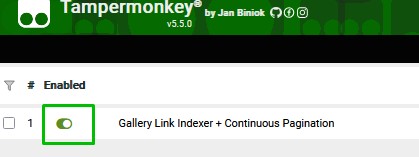
4. The script will activate immediately, which you can see in Dashboard extension.
Image

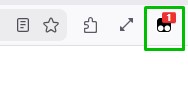
5. After when you open gallery, script run automaticaly, number 1 will appear on Tampermonkey icon.
The script only works on the following pages:
https://www.imagefap.com/pictures/...
https://www.imagefap.com/gallery/...
Image

Sample of correct script work:
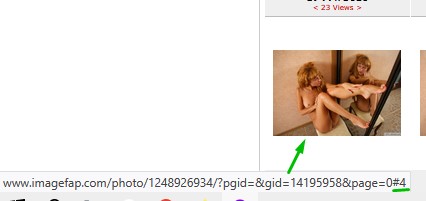
Full-size image links will automatically have #0, #1, #2, #3, etc. appended to the end. Like this:
https://www.imagefap.com/photo/35496326 ... 958&page=0#1
https://www.imagefap.com/photo/63426004 ... 958&page=0#9
https://www.imagefap.com/photo/13940379 ... 958&page=0#22

Image
Last edited by alexlove88 on Sat Aug 08, 2026 3:37 pm, edited 1 time in total.
User avatar
alexlove88
 
Posts: 4
Joined: Sun Jul 19, 2026 4:14 pm

Re: [SOLUTION] Wrong images opening when clicked

Postby mrztmp on Sun Jul 26, 2026 3:20 pm

Thank you very much! I don't understand why this very annoying problem hasn't been solved yet, as it greatly reduces the usability of the site.
User avatar
mrztmp
 
Posts: 2
Joined: Wed Jun 16, 2010 5:43 pm

Re: [SOLUTION] Wrong images opening when clicked

Postby Zedword on Wed Aug 05, 2026 1:40 am

Thank you! Is there any way to make this work for saved pictures in favorites as well?
User avatar
Zedword
 
Posts: 1
Joined: Mon Jul 06, 2020 11:06 pm

Re: [SOLUTION] Wrong images opening when clicked

Postby alexlove88 on Wed Aug 05, 2026 12:14 pm

Zedword wrote:Thank you! Is there any way to make this work for saved pictures in favorites as well?

Unfortunately, pics in favorites are located in different galleries. Script does not know about number of images in each gallery, so it is not possible to simply insert numbering into link.
User avatar
alexlove88
 
Posts: 4
Joined: Sun Jul 19, 2026 4:14 pm

Re: [SOLUTION] Wrong images opening when clicked

Postby Bulk_Processor_X on Fri Aug 07, 2026 12:50 pm

Ran the script through some checkers to see if it contains any hidden malicious code and the checkers all said it was clean so I followed the instructions and installed it.

Unfortunately I am still running into the problems that the script is supposed to solve. I will be in a gallery with a /gallery/ URL (https://www.imagefap.com/gallery/*) and when I click on an image it still opens the wrong image.

Really don't feel like trying to troubleshoot it so just uninstalling it. Its still nice to see that people are trying to come up with workarounds to the issue and are sharing what works for them.

Chrome Version 151.0.7922.108 (Official Build) (x86_64)
Tampermonkey Version 5.5.0
OS: Linux Mint 21.3

BTW: It's shameful that this site can be in such poor working order. This place has always had all kinds of minor issues, being a free site I can't complain too much about that. But this latest problem is such a huge usability issue that it makes the site borderline unusable. Even that wouldn't bother me as much if the people who own and maintained the site would be a little more transparent about whats going on, giving a concrete timeline for a fix, etc.

Oh well. Guess maybe it's time to revert to the analog of my youth and go dig out my stash of old Hustlers and Naughty Neighbors.
User avatar
Bulk_Processor_X
 
Posts: 1
Joined: Sat May 23, 2026 10:49 am

Re: [SOLUTION] Wrong images opening when clicked

Postby alexlove88 on Sat Aug 08, 2026 3:32 pm

Bulk_Processor_X wrote:Unfortunately I am still running into the problems that the script is supposed to solve. I will be in a gallery with a /gallery/ URL (https://www.imagefap.com/gallery/*) and when I click on an image it still opens the wrong image.

Chrome Version 151.0.7922.108 (Official Build) (x86_64)

If you're using Chrome, you might need to enabling additional permissions to allow user scripts to work. This guide might help:
https://www.tampermonkey.net/faq.php?q= ... le=en#Q209

alexlove88 wrote:5. After when you open gallery, script run automaticaly, number 1 will appear on Tampermonkey icon.
The script only works on the following pages:
https://www.imagefap.com/pictures/...
https://www.imagefap.com/gallery/...
Image

and check Tampermonkey icon, does script become active.
User avatar
alexlove88
 
Posts: 4
Joined: Sun Jul 19, 2026 4:14 pm


Return to General Off Topic

Who is online

Users browsing this forum: No registered users and 7 guests